
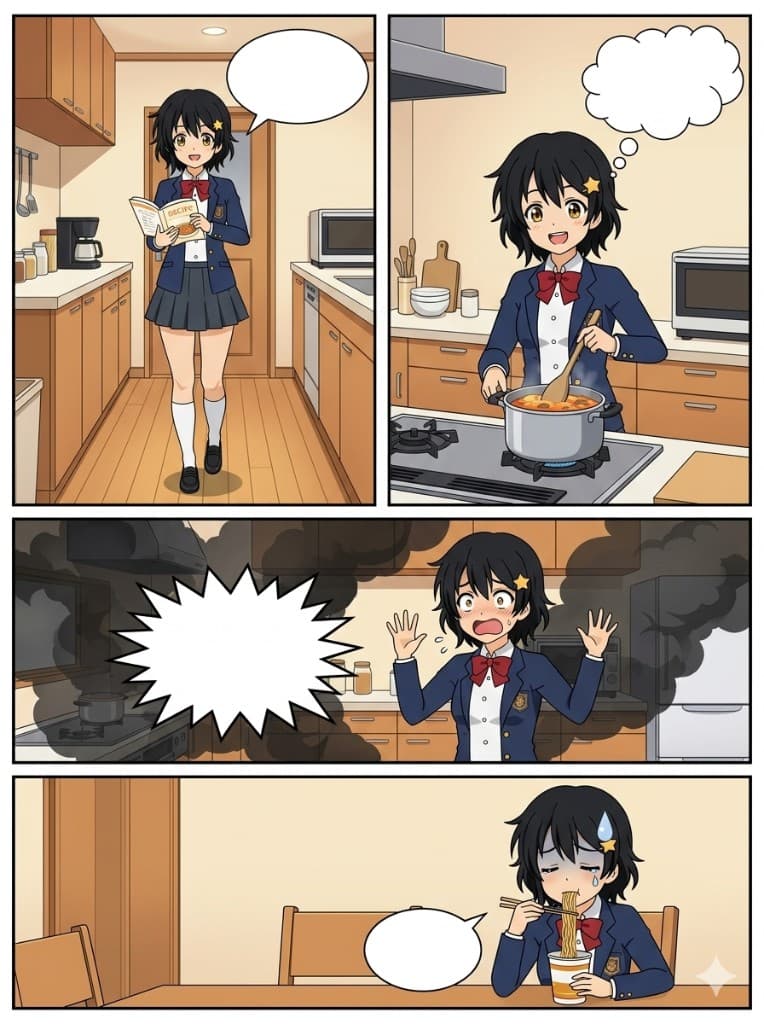
The hardest part of making AI anime comics isn't generating beautiful art — it's keeping your character looking like themselves from one panel to the next. Free AI tools don't have a "lock this character" button. But there's a technique that gets you 80–85% consistent results without spending a cent, using ChatGPT, Google Gemini, or Microsoft Copilot.
This guide gives you the complete workflow plus two copy-paste prompt sequences — a 4-panel slice-of-life yonkoma and a 6-panel action page — that you can use in ChatGPT or Gemini right now.
Why Character Consistency is Hard — and the Free Solution
When you ask an AI to generate a new image, it starts from scratch. Your character from the previous panel exists nowhere in its memory unless you explicitly re-anchor them every time.
The paid solution (Midjourney's --cref flag) lets you upload a character image that gets "locked" into every generation. At $10/month it's powerful — but unnecessary for getting started.
The free solution is conversation threading combined with a character sheet upload.
Here's the exact method:
- Generate a character sheet in your first prompt — full body, front view, clean white background
- Stay in the same chat session for all panel generations that follow
- In every panel prompt, upload that character sheet image and reference it explicitly: "Using the character shown in the reference image above..."
- The AI uses the uploaded image as a visual anchor while following your new panel instructions
What stays consistent: Hair color and style, face shape, eye color, outfit colors, distinctive accessories, body proportions.
What drifts slightly: Minor details like exact earring shape, belt buckle, shoe style. This is normal — it reads as the natural variation of a hand-drawn comic rather than a flaw.
Step 1 — Generate Your Character Sheet
Before any panels, you need a reference image. This is the single most important step. Use this prompt in ChatGPT or Gemini:
Generate an anime character design sheet.

Character: [girl], age [16], personality: [cheerful, impulsive, kind].

Layout: Single figure on a completely clean white background. Full body from head to toe.
Front-facing, neutral standing pose, arms slightly away from body so clothing is visible.

Physical details:
- Hair: [black] hair, [short messy bob with side-swept bangs]
- Eyes: Large anime eyes, [amber] iris, bright white catchlights
- Height/build: [average height, slim build]

Outfit:
[Navy blue school blazer, white button-up shirt underneath, red ribbon bow tie,
dark grey pleated skirt, white knee-high socks, black loafers]

Distinctive feature (pick one memorable detail):
[A small star-shaped yellow hairpin above the left ear]

Art style: Clean anime cel-shading, flat areas of color, crisp black outlines, no
background elements, no drop shadow on the floor. This is a design reference —
clarity matters more than drama or atmosphere.

Do not add speech bubbles, panel borders, labels, or any text.
Here is what the above prompt produces — Hana, the example character used throughout this guide:
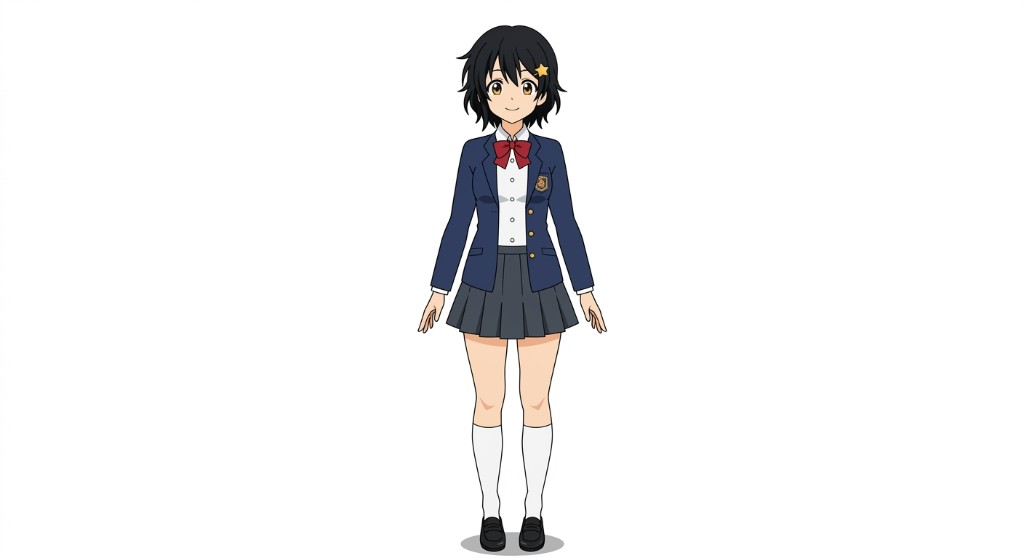
Save this image. It is your character anchor for this entire project — you will upload it at the start of every panel generation.
Step 2 — The Panel Layout Vocabulary
Before the full prompt sequences, here are the layout terms that ChatGPT and Gemini understand reliably:
Yonkoma (四コマ) — 4-panel vertical strip: Four equal rectangular panels stacked top-to-bottom in a single column. Classic manga magazine and newspaper format. The structure naturally follows: Setup → Development → Turn → Punchline. Best for comedy and short emotional moments.
6-panel manga page: Typically arranged as two rows of three equal panels, or a more dynamic layout mixing one wide establishing panel with smaller action panels. Better for scenes with movement, escalating tension, or a dramatic reveal.
Gutter: The border or gap between panels. Always specify "visible black gutters" for a clean manga look.
Splash panel: A single large panel dominating most of the page, sometimes with small inset panels. For dramatic entrances or final reveals.
Step 3 — The Empty Speech Bubble Formula
The most common failure when generating comic panels is AI filling speech bubbles with garbled text. The fix is precise language. Copy this block into every panel prompt:
Speech bubbles: Include [2] empty white speech bubbles positioned near the speaking characters.
Each bubble must be completely blank inside — no text, no letters, no symbols, no placeholder
marks of any kind. Pure white interior. Oval shape with a small pointed tail aimed at the
speaker's mouth.
For thought bubbles:
Thought bubbles: Cloud-shaped — a chain of small circles leading to a larger cloud. Interior
must be completely blank and white. No text or symbols inside.
For action/shout panels:
Action burst: One jagged star-shaped speech burst near [the character's raised fist]. Interior
completely blank — no onomatopoeia, no sound effect text, no symbols. Just the empty burst shape.
If bubbles still contain text (correction prompt):
The speech bubbles in the last image contained text. Please regenerate the same panel with
one change only: the interiors of all speech bubbles must be pure white and completely empty —
no text, letters, symbols, or decorative marks of any kind. Everything else stays the same.
Complete Prompt Sequence 1: 4-Panel Yonkoma (Slice-of-Life Comedy)
Run these prompts in order, in the same chat session. After generating your character sheet in Step 1, stay in the same conversation for all steps below.
Prompt 1 — The 4-Panel Strip
Here is the result this prompt produces with Hana — four panels, consistent character, empty speech bubbles ready for your dialogue:
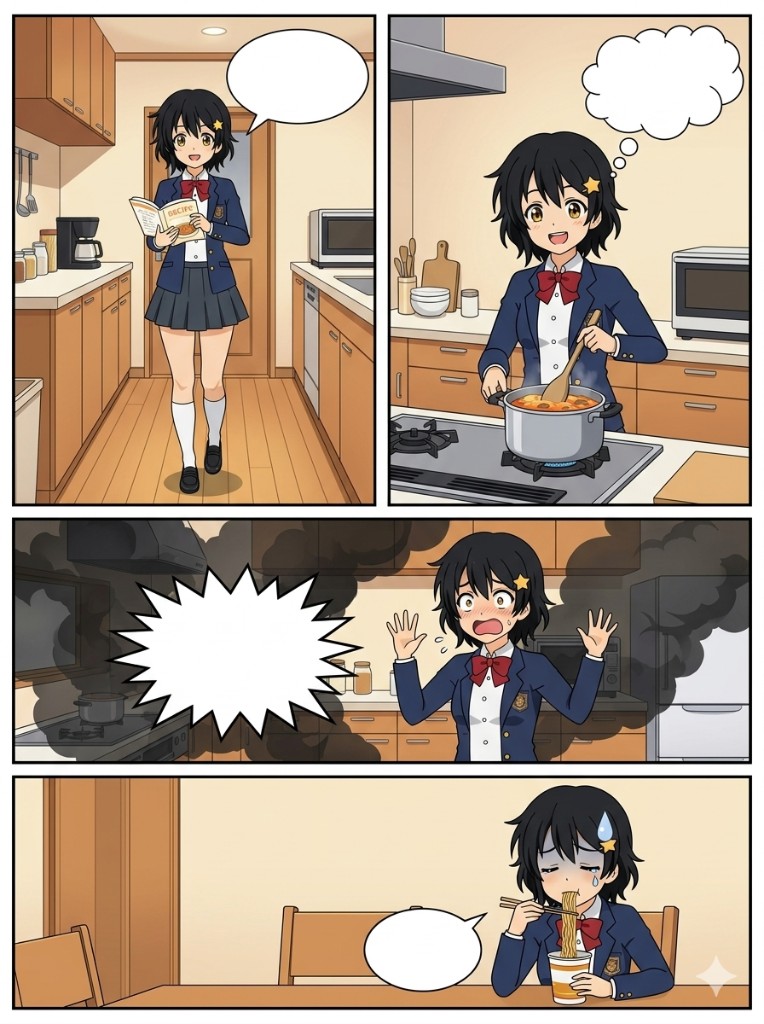
Upload your character sheet image, then paste this prompt:
Using the character shown in the reference image I have attached above, generate a
4-panel vertical yonkoma comic strip.

Story (slice-of-life comedy):
Panel 1 — Setup: The character walks confidently into a kitchen, holding a recipe book
open, expression bright and determined.
Panel 2 — Development: The character is cooking at the stove, stirring a pot with an
extremely proud expression, imagining a perfect dish.
Panel 3 — Turn: The smoke alarm goes off. Black smoke billows around them. Their
expression is pure panic — wide eyes, open mouth, both hands raised.
Panel 4 — Punchline: The character sits at a table eating instant noodles straight from
the cup. One tear running down their cheek. A small anime sweat drop on their forehead.
Defeated, exhausted expression.

Layout: 4 equal rectangular panels arranged in a single vertical column (portrait
orientation — taller than wide). Same width for all 4 panels. Visible black gutters
between each panel. No panel numbers or labels.

Character consistency: Use the attached reference image. Keep the hair color, hairstyle,
face shape, eye color, and outfit consistent across all 4 panels.

Speech bubbles:
- Panel 1: One empty oval speech bubble above the character's head, tail pointing toward
  their mouth. Completely blank white inside — no text.
- Panel 2: One empty thought cloud bubble (cloud shape, no tail) in the upper corner.
  Completely blank white inside.
- Panel 3: One large jagged/spiky action burst shape near the character. Empty — no
  text or symbols inside.
- Panel 4: One small oval speech bubble. Completely blank white inside — no text.

Art style: Clean slice-of-life anime aesthetic, bright and warm colors. Similar in feel
to K-On!, Nichijou, or Azumanga Daioh. Clear, expressive character emotions. Black panel
borders and gutters.

Do not add any text, dialogue, captions, sound effects text, or watermarks anywhere in
the image. All speech bubble interiors must be pure white.
Prompt 1B — Variant Story Beat
Here is what this variant produces — same character, same session, completely different story:
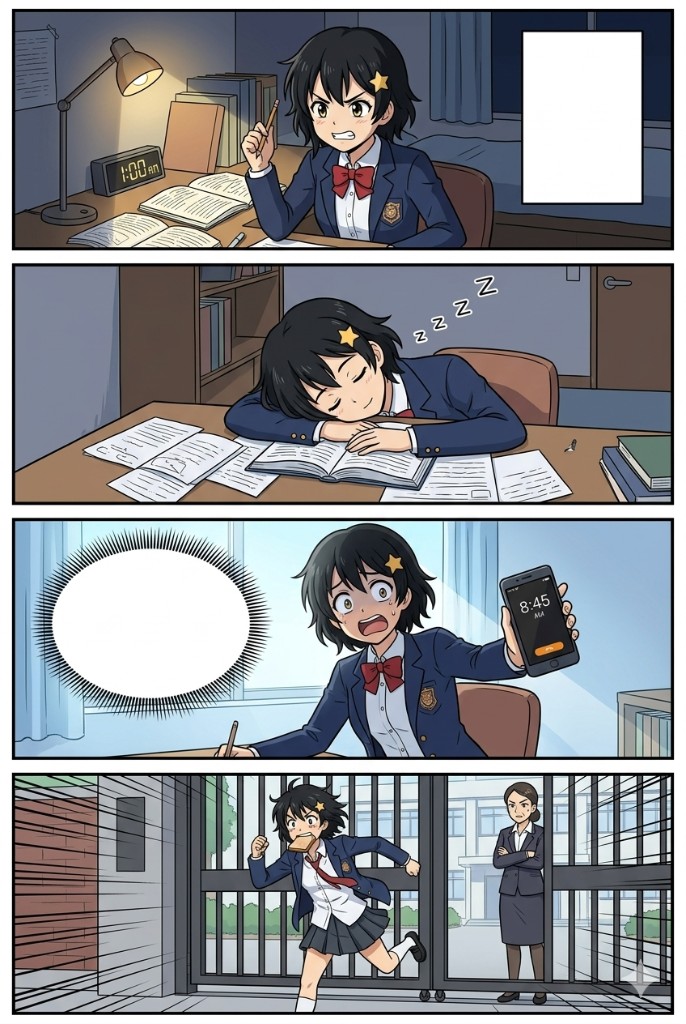
Use this in the same session if you want a second strip with the same character:
Using the same character from the reference image I uploaded earlier in this conversation,
generate another 4-panel yonkoma with a different story:

Panel 1 — Setup: The character sits at a desk late at night, surrounded by textbooks and
papers, pencil raised, expression fiercely determined. A clock on the wall shows 1 AM.
Panel 2 — Development: The character has fallen asleep face-down on the open textbook.
Papers everywhere. Peaceful sleeping expression. Small "Zzz" bubbles rising — but these
should be part of the art as floating 'z' shapes, not in a speech bubble.
Panel 3 — Turn: The character bolts upright, eyes wide, morning sunlight flooding the
room. They are holding their phone showing an alarm: 8:45 AM. Expression: absolute panic.
Panel 4 — Punchline: The character sprints through school gates, uniform half-tucked,
hair wild, toast in their mouth. The gate is closing. A stern teacher stands watching
with crossed arms.

Layout: Same as before — 4 equal panels, single vertical column, visible black gutters,
portrait orientation.

Speech bubbles:
- Panel 1: One empty rectangular inner-monologue bubble (sharp rectangular corners, no
  tail) in the upper area. Blank white inside.
- Panel 3: One large oval speech bubble with a jagged outline (shocked/shouting style).
  Blank white inside — no text.

Same art style as before. No text, captions, or labels anywhere. All bubble interiors
pure white.
Prompt 1C — Single Panel Correction
If any individual panel drifted from your character, use this:
Panel [3] in the last image has a character inconsistency. Please regenerate
panel [3] only as a standalone image — same size and composition as it appeared
in the strip — using the character reference image I uploaded at the start of this
conversation to correct: [the hair color changed from black to brown — it should
be black, and the star-shaped yellow hairpin above the left ear is missing].
Keep the scene, expression, and speech bubble position exactly the same.
All bubble interiors must remain blank white.
Complete Prompt Sequence 2: 6-Panel Action Page (Shonen)
This sequence generates a 6-panel manga action page. Works well on Gemini, ChatGPT, and Microsoft Copilot.
Prompt 2 — The 6-Panel Action Page
Here is the result — six panels, dynamic layout, consistent character, empty speech bubbles throughout:
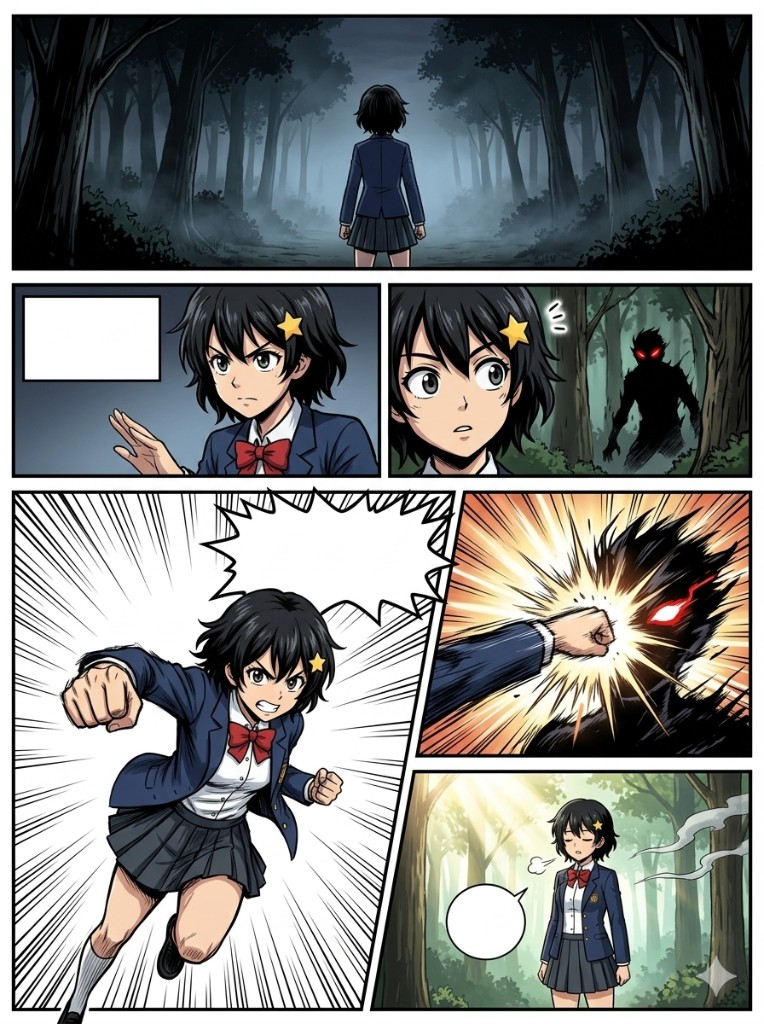
Upload your character sheet image, then paste this prompt:
Using the character shown in the reference image I have attached above, generate a
6-panel manga action page.

Story (shonen action):
Panel 1 — Wide establishing shot: The character stands at the entrance of a dark, mist-
filled forest at dusk. Viewed from behind. They face the treeline. The atmosphere is
tense, foreboding.
Panel 2 — Medium close-up: The character's face in three-quarter view. Expression:
calm and determined, eyes sharp and focused. One hand raised slightly, ready.
Panel 3 — Reaction panel: A shadowy figure emerges from the trees — a dark silhouette
with glowing red eyes. The character's eyes widen — not fear, recognition.
Panel 4 — Action panel (largest panel on the page): The character charges forward,
dominant hand pulled back in a punch, full dynamic motion. Speed lines radiate outward
from the character. Expression: fierce, all-out effort. This panel should be larger
than the others — it is the climax panel.
Panel 5 — Impact panel: A close-up of the point of impact — the punch connecting with
the shadowy figure. Explosive burst of energy lines, motion blur, dramatic light flash.
Panel 6 — Resolution wide shot: The character stands as morning light breaks through the
trees. The shadowy figure has dissolved into wisps of smoke. The character's expression:
quiet, exhaling, relieved. The forest behind them is now bright and peaceful.

Layout: 6 panels arranged dynamically across the page:
- Row 1: Panel 1 — full-width wide panel (spans the entire top of the page)
- Row 2: Panel 2 and Panel 3 — two equal panels side by side
- Row 3: Panel 4 — large panel taking roughly 60% of the row width on the left;
  Panel 5 and Panel 6 stacked vertically on the right taking 40% of the row width
Visible black gutters between all panels.

Character consistency: Use the attached reference image. Maintain consistent hair, face,
eye color, and outfit across panels 1 through 6. In action panels, clothing may be
slightly wind-blown or disheveled — that is fine.

Speech bubbles:
- Panel 2: One empty rectangular inner-monologue bubble (sharp corners, no tail) in the
  upper-left corner of the panel. Blank white inside — no text.
- Panel 4: One large jagged/spiky action burst shape in the upper area of the panel —
  this represents a battle cry. Interior completely blank — no text, no letters.
- Panel 6: One small oval speech bubble near the character. Blank white inside — no text.
All other panels: no speech bubbles.

Art style: High-energy shonen manga aesthetic. Dynamic linework, strong black ink
outlines, cel-shading with dramatic shadows. Speed lines and motion effects in action
panels. Similar feel to Demon Slayer or My Hero Academia. Dramatic backlighting in
panel 1 and panel 6.

Do not add any text, sound effects text, dialogue, captions, panel numbers, or watermarks
anywhere in the image. All speech bubble interiors must be pure white and empty.
Prompt 2B — Dramatic Close-Up Add-On
Here is the result — a standalone chapter header panel with Hana half in light, half in shadow, empty monologue box ready for an inner thought:
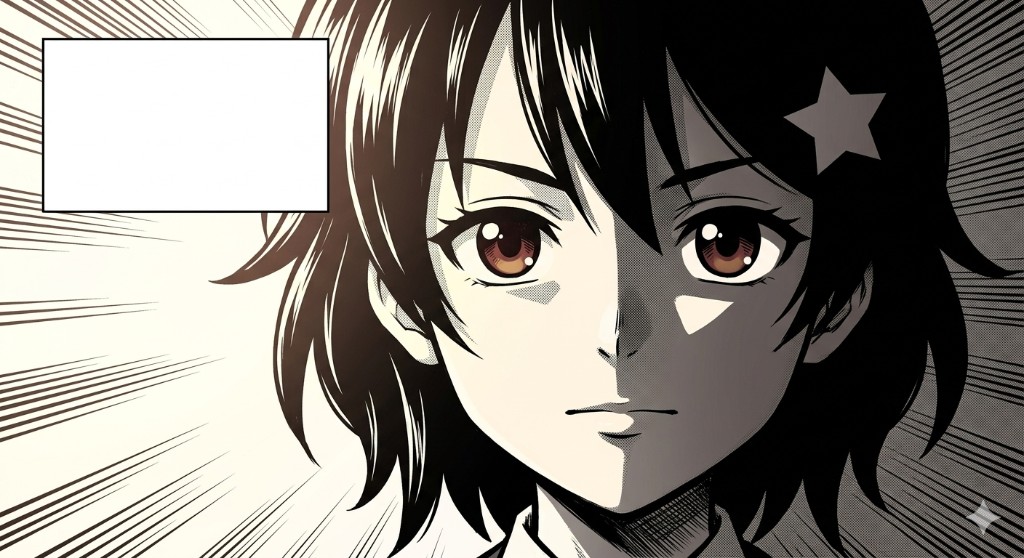
Use this in the same session to generate a bonus hero panel for use as a chapter header or standalone image:
Using the character from the reference image I uploaded earlier in this conversation,
generate a single standalone manga panel — a dramatic portrait close-up.

Composition: The character's face fills most of the frame. One side of their face is lit
brightly (warm light from the left), the other side is in deep shadow. Expression: calm,
resolute, eyes looking directly at the viewer with quiet confidence.

Background: Abstract screentone-style radial lines emanating outward from behind the
character — the classic manga emphasis effect. No environmental details.

Speech bubble: One rectangular inner-monologue bubble in the upper-left corner of the
panel, with sharp corners and no tail. Interior completely blank white — no text, no
symbols.

Art style: Shonen manga key frame quality. Bold ink linework, high contrast, minimal
color — this can be in black and white or a muted limited palette (dark tones with one
accent color for the character's eyes or a power effect). Cinematic crop.

No text, captions, or watermarks anywhere. Bubble interior is blank white.
Prompt 2C — Villain Confrontation Variant
Here is the result — same character, rooftop night setting, black-and-white manga aesthetic with empty speech bubbles throughout:
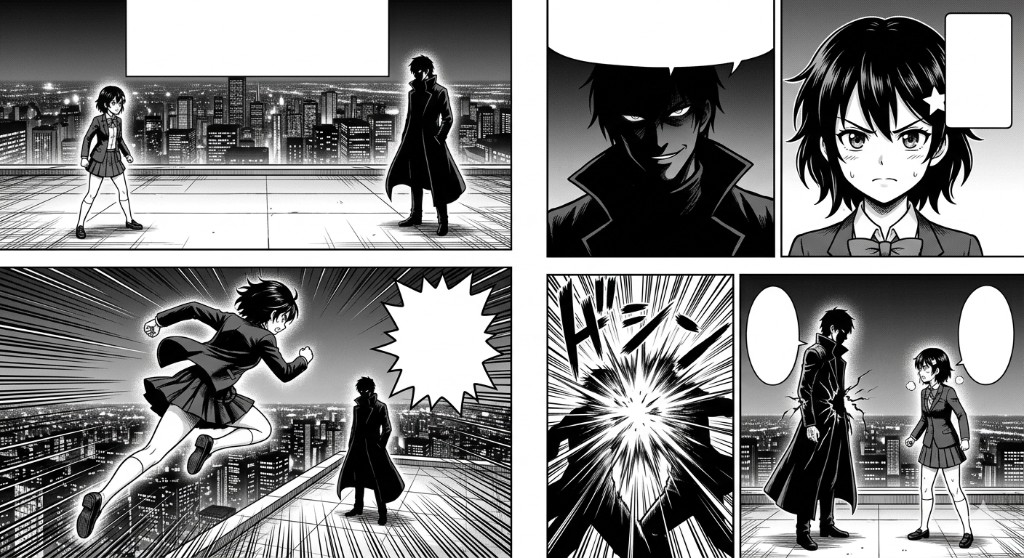
An alternative 6-panel story if you want to try a different scene with the same character:
Using the character from my reference image uploaded earlier this session, generate a
6-panel manga page with a villain confrontation scene:

Panel 1 — Wide: A rooftop at night. The city stretches below. The character stands on
one side. Across from them stands a villain — taller, in a long dark coat, face obscured
by shadow.
Panel 2 — Villain close-up: A partial close-up of the villain — only their smirking mouth
and glowing eyes are visible from the shadow. Menacing, calm expression.
Panel 3 — Character reaction: Our character's full face — jaw set, slight frown, eyes
narrowed. They have made a decision.
Panel 4 — Action: The character leaps forward across the rooftop gap toward the villain.
Dynamic mid-air pose, cape or jacket flaring. Cityscape below. Speed lines.
Panel 5 — Clash: The two figures collide — an explosive burst of energy at the point of
contact, both figures partially silhouetted by the light of the explosion.
Panel 6 — Hold: Both characters have landed. They are still, facing each other. The
villain is cracked — damage visible on their coat. Our character breathes hard but stands
firm. City lights behind both.

Layout: Same 6-panel layout as the action page above (full-width top panel, two panels
middle row, large left + two small right for bottom row).

Speech bubbles:
- Panel 3: Empty rectangular thought bubble, blank white inside.
- Panel 4: Empty jagged action burst, blank white inside.
- Panel 6: Empty oval bubble for each character (two total), blank white inside.
No text inside any bubble.

Same shonen art style as the action page. No text, captions, or watermarks anywhere.
Prompt Tips for Maximum Consistency
Repeat your character description in text alongside the uploaded image. Even when uploading the reference sheet, add a written anchor block to every prompt. Copy and customize:
Character anchor: [Hana] — [girl], approximately [16]. Hair: [black], [short messy
bob with side-swept bangs]. Eyes: large anime eyes, [amber] iris. Outfit: [navy blue
school blazer, white button-up shirt, red ribbon bow tie, dark grey pleated skirt,
white knee-high socks, black loafers]. Distinctive feature: [star-shaped yellow
hairpin above the left ear]. Refer to the uploaded reference image for all visual details.
Lock your art style phrase and never change it between panels. Once you find a descriptor that produces results you like — for example, "clean anime cel-shading, warm slice-of-life palette, K-On! aesthetic" — copy it verbatim into every subsequent prompt. Changing even one style keyword causes more character drift than anything else.
One session per character. Start a new chat session and all conversation context is gone. Do all panels for one comic project in a single chat session.
Handle drift with a targeted correction, not a full regeneration. If panel 4 changes your character's hair color, say: "Please regenerate panel 4 only, correcting the hair from brown back to black as shown in my reference image. Scene and composition stay exactly the same."
For longer projects: If your session gets very long and consistency starts degrading, re-upload the character sheet image and write: "Refreshing character reference — please use this image as the canonical design for all further panels in this conversation."
Step 4 — Assemble Your Strip in Canva (Free)
To combine separately generated panels or add your own dialogue over the empty bubbles:
- Go to canva.com — free account, no subscription needed
- Create new design → Custom size:
- 4-panel yonkoma: 800 × 2400 px (portrait)
- 6-panel manga page: 1200 × 1600 px (landscape or square)
- Upload all panel images from your chat session
- Drag panels into position, align edges, remove any gaps
- Use the Text tool to add your dialogue directly over the blank speech bubbles
- For font style: Bangers (shonen/action), Comic Neue (slice-of-life), or Anime Ace — all available free in Canva
- Export as PNG (highest quality) or PDF
That's the complete pipeline from prompt to shareable comic strip.
Free Tool Comparison
| Tool | Cost | Strengths for Comics | Limitation |
|---|---|---|---|
| Google Gemini | Free | Best at multi-panel layout instructions; empty bubble compliance is reliable | Occasionally softens linework too much |
| Microsoft Copilot | Free (no account needed) | High-quality cel-shading; no daily generation limit; great for action panels | Complex panel layouts need more prompt iteration |
| ChatGPT free | Free (daily limit) | Follows detailed instructions very precisely; best for correction prompts | Limited generations per day on free tier |
| Adobe Firefly | Free (25 credits/month) | Clean manga linework; accurate anatomy | Credits exhausted quickly on multi-panel work |
| Ideogram | Free tier available | Strong at respecting layout structure | Less consistent on anime-specific aesthetics |
Power User Upgrade: Midjourney --cref
If you want pixel-perfect character consistency across dozens of panels, Midjourney v7's Character Reference flag is the paid upgrade worth knowing about.
[your panel prompt] --niji 6 --cref [paste the URL of your character sheet image here] --cw 100
--cref locks your character's appearance. --cw 100 sets character weight to maximum (full lock). --niji 6 is Midjourney's anime-optimized model.
Cost: $10/month (Basic plan). For occasional projects, the free tools above are sufficient. For a serialized comic with recurring characters across 50+ panels, --cref saves significant iteration time.
Related Resources
- ChatGPT Anime Art Prompts: Complete Guide — 40+ style templates including the character sheet prompt this workflow builds on; start here if you haven't generated anime characters before
- AI Webtoon & Manhwa Prompts Guide — Apply the same comic strip technique to Korean webtoon/manhwa aesthetics (Solo Leveling, True Beauty, Tower of God) with vertical scroll panel layouts
- Anime Art Styles Guide — Choose the right visual style for your comic's genre before you start
Conclusion
The pipeline from character idea to shareable anime comic strip is shorter than most people expect. The conversation threading technique — character sheet first, same session throughout, reference image uploaded with every panel prompt — gets you consistent results on tools that cost nothing.
Start with the 4-panel yonkoma. The format has a natural story shape built in, it's forgiving of minor character drift between panels, and you can go from zero to a finished strip in under an hour. Once the consistency method feels natural, the 6-panel action page opens up everything else — multi-scene storytelling, hero moments, villain confrontations.
The empty speech bubbles are waiting for your words.