
The 60-second version
Want the single prompt that covers most photos? Get the ChatGPT photo enhancement prompt → One copy-paste prompt, with before/after examples.
What you need to know if you have under a minute:
- Upload your photo to ChatGPT (GPT-4o or DALL-E 3 model).
- Pick the prompt template below that matches your photo type.
- Copy it, paste it under your image, and send.
- For actual pixel upscaling (more output pixels), finish in Topaz Photo AI or Magnific — ChatGPT re-renders the scene rather than resizing the file.
The fastest universal starting prompt — copy it now:
Enhance this photo to 4K ultra-high resolution. Preserve the original subject and composition. Sharpen fine detail throughout, reduce noise and compression artifacts, and improve color accuracy. Output: photorealistic, tack sharp, 4K ultra HD, professional RAW photography look.
For photo-type-specific results, use one of the 10 targeted templates below — they produce noticeably sharper outputs than the generic version.
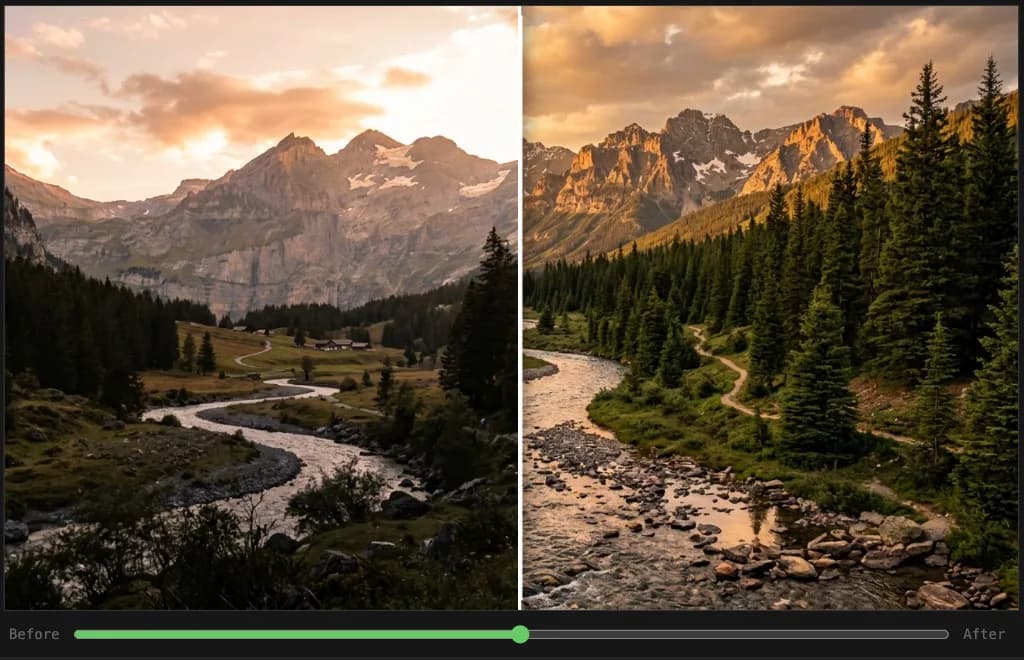
Before → after: what these prompts actually produce
The practical result of using a specific 4K enhancement prompt instead of a vague request is visible sharpness — hair strands and eye detail in portraits, water texture and foliage in landscapes, surface grain and edge definition in products. A vague prompt ("make this 4K") produces slight sharpening at best; a structured prompt with a quality stack and subject-specific instructions produces a dramatically crisper, more detailed re-render that reads as genuinely high-quality photography.
What changes most visibly: edge sharpness, noise removal, color depth, and fine texture detail. What stays the same when you write the prompt correctly: composition, subject identity, and overall scene framing.
When most people search for "4K photo prompt for ChatGPT," they're thinking about one of two very different things — and confusing them leads to disappointing results. The first is 4K image generation: asking an AI to create a brand-new image at high resolution. The second — and often more practically useful — is 4K photo enhancement: describing how an existing photo should be transformed, upscaled, or reimagined at higher quality.
This guide focuses squarely on the second category. Whether you're working with a blurry vacation shot, a low-light portrait, or an old scanned photograph, the right prompt can instruct ChatGPT (with DALL-E 3), Midjourney, or Flux to produce a dramatically sharper, more detailed version of your original image. If you are generating new scenes from scratch instead, start with the complete ChatGPT 4K image prompts guide and the 8K ultra HD image prompts companion. Below you'll find 10 copy-paste prompt templates, a breakdown of quality keywords that matter most, common mistakes to avoid, and a plain-English tool comparison.
10 Ready-to-Use 4K Photo Enhancement Prompts
Jump to your photo type: Portrait · Landscape · Product · Low-light · Restoration · Wildlife · Street · Group · Architecture · Macro
Each template below follows a consistent structure: describe the original photo's subject, specify the enhancement goals, and layer in 4K quality keywords. Swap the bracketed sections with your own details.
Portrait photo enhancement
"Enhance this portrait photograph to 4K ultra-high resolution. Preserve the subject's natural facial features and skin tones while improving clarity, sharpening fine details like hair texture and eye definition, and reducing noise. Output: photorealistic, 4K resolution, tack sharp, professional studio quality, true-to-life color grading, no artificial smoothing."
For portraits specifically, the key additions are calling out no artificial smoothing (prevents the plastic-skin effect) and referencing true-to-life color grading (avoids orange or overexposed skintones). See the ChatGPT 4K portrait prompts guide for 8 more portrait-specific variations.
Landscape photo enhancement
"Upscale and enhance this landscape photograph to 4K quality. Bring out fine details in the foreground — grass blades, rock texture, water ripples — and sharpen the mid-ground and background elements. Improve dynamic range so shadows and highlights are both visible. Output: 4K ultra HD, cinematic clarity, RAW photography look, rich color depth, sharp throughout."
The phrase dynamic range so shadows and highlights are both visible is important for outdoor scenes — it stops AI tools from blowing out skies or crushing dark foregrounds. For ultra-wide landscape work, see ChatGPT 4K landscape prompts.
Product photo enhancement
"Transform this product photograph into a 4K ultra-high-definition studio-quality image. Sharpen all edges, render surface textures precisely (glossy reflections, matte finishes, fabric weave), remove background noise, and correct color accuracy. Output: 4K resolution, commercial product photography quality, clean white or neutral background, razor-sharp detail, professional lighting."
Low-light photo improvement
"Enhance this low-light photograph by reducing grain and digital noise while preserving existing ambient light and mood. Bring out hidden shadow detail, improve overall sharpness, and recover color accuracy without over-brightening. Output: 4K resolution, noise-free, natural lighting preserved, cinematic clarity, rich shadows with visible detail."
Old or blurry photo restoration
"Restore and enhance this old or blurry photograph to 4K quality. Reconstruct lost detail, sharpen facial features and objects, repair any scratches or fading, and improve overall image clarity while maintaining a realistic, authentic feel. Output: 4K resolution, restored vintage photograph, photorealistic detail reconstruction, true-to-era color palette, sharp and clean."
Nature and wildlife photo enhancement
"Enhance this nature/wildlife photograph to 4K ultra-HD quality. Sharpen animal fur, feathers, or scales to individual-strand detail. Improve the clarity of foliage, water, and sky. Boost natural colors without oversaturation. Output: 4K resolution, wildlife photography quality, National Geographic-style sharpness, vivid natural colors, deep depth of field."
Street and urban photo enhancement
"Upscale this street photography image to 4K resolution. Sharpen architectural details, signage, and textures (concrete, brick, glass). Preserve the documentary character of the scene — natural lighting, authentic colors, real-world grain converted to crisp detail. Output: 4K quality, architectural sharpness, street photography aesthetic, cinematic clarity, authentic color grading."
Group photo clarity improvement
"Enhance this group photo to 4K quality. Improve the sharpness and clarity of every person in the frame, recover faces that are slightly out of focus, reduce motion blur, and correct for uneven lighting across the group. Output: 4K resolution, every face sharp and well-lit, professional event photography quality, natural skin tones, noise-free."
Architectural photo enhancement
"Transform this architectural photograph into a 4K professional image. Sharpen all structural details — brickwork, window frames, decorative elements, roof lines. Correct lens distortion, improve sky clarity and dynamic range, and enhance material textures (stone, glass, steel, wood). Output: 4K ultra HD, architectural photography standard, perfect vertical lines, rich tonal range."
For real-estate specific variants with drone shots and twilight edits, see ChatGPT 4K real-estate photography prompts.
Macro and close-up photo sharpening
"Enhance this macro/close-up photograph to 4K quality. Maximize sharpness in the primary focal plane, render microscopic textures (insect wings, flower petals, material fibers) with exceptional clarity. Preserve a soft, creamy background bokeh. Output: 4K resolution, extreme micro-detail, macro photography quality, perfect subject sharpness, smooth background separation."
ChatGPT upscale image prompt
Copy-paste this now — works on any photo type:
"Upscale this uploaded photograph to 4K ultra-high resolution. Preserve the original subject, pose, and composition exactly. Sharpen fine detail throughout, reduce noise and compression artifacts, and improve color accuracy. Do not change the scene or add new elements. Output: photorealistic, tack sharp, 4K ultra HD, professional RAW photography look."
For portraits, replace the last line with: "Output: tack sharp, 4K ultra HD, studio-quality portrait, natural skin texture preserved, publication-ready."
The structure behind these prompts: ChatGPT (with DALL-E 3) re-renders the scene rather than running a pixel-level upscaler, so treat these as creative upscaling — identity, framing, and fine detail must be spelled out or the model will improvise. For true pixel upscaling on the same file (more output pixels, no reinterpretation), use Topaz Photo AI or Magnific after the ChatGPT re-render. For Stable Diffusion-based pixel restoration, see Stable Diffusion upscaling prompt keywords.
Minimal structure
- Action — Upscale / re-render this photo to 4K ultra-high resolution.
- Preserve — Same subject, pose, and general composition as the original.
- Improve — Sharpen edges, recover texture, reduce noise or JPEG artifacts.
- Output — Tack sharp, photorealistic, professional photography quality.
Copy-paste ChatGPT upscale image prompt (general)
"Upscale this uploaded photograph to 4K ultra-high resolution. Preserve the original subject, pose, and composition. Sharpen fine detail throughout, reduce noise and compression artifacts, and improve color accuracy. Do not change the scene or add new elements. Output: photorealistic, tack sharp, 4K ultra HD, professional RAW photography look."
Copy-paste prompt to upscale an image (portraits)
"Upscale this portrait to 4K quality. Keep the same person and expression. Enhance eye and hair detail, natural skin texture (no plastic smoothing), and correct color cast. Output: 4K ultra HD, tack sharp, studio-quality portrait, publication-ready."
If you need true resolution on the same file (more output pixels without reinterpretation), use a dedicated upscaler (for example Topaz Photo AI or Magnific) after or instead of ChatGPT; the templates earlier in this guide still help you brief the model for the best possible re-render.
ChatGPT vs Topaz vs Magnific: which tool to use
Quick answer: Use ChatGPT for creative enhancement and scene relighting; Topaz Photo AI for true pixel upscaling on an existing file; Magnific AI when you want photorealistic micro-detail added to portraits or products. The best results come from combining them: ChatGPT first (to guide quality and enhance detail direction), then Topaz or Magnific for true pixel upscaling.
Here's the full plain-English breakdown:
ChatGPT (DALL-E 3 / GPT-4o)
- How it works: Re-renders or reimagines the scene at high quality from your description.
- Best for: Creative restoration, relighting, stylistic enhancement, and generating new scenes.
- Limitation: Does not increase actual file resolution — output pixel count is fixed by the model.
- Cost: Free tier available; GPT-4o requires a Plus subscription.
Topaz Photo AI
- How it works: True AI upscaling — reconstructs pixels in the original file and outputs a larger image.
- Best for: Genuine pixel upscaling, noise reduction, and sharpening of existing photos with no creative changes.
- Limitation: No creative re-rendering; what's in the photo stays in the photo.
- Cost: One-time purchase (around $199); trial available.
Magnific AI
- How it works: Diffusion-based upscaling with optional "hallucination" — can add realistic micro-detail not in the original.
- Best for: Portrait and product photos where you want photorealistic texture added, not just sharpened.
- Limitation: Can over-hallucinate on faces if creativity setting is too high.
- Cost: Subscription-based; free credits on sign-up.
The recommended workflow: Use a ChatGPT prompt from this guide to get the enhancement direction right, then pass the output through Topaz or Magnific for true pixel upscaling. You get the best of both: creative quality guidance + real resolution increase.
For a deeper comparison of generative vs pixel upscaling, see AI upscale image to 4K: sample prompts.
Key 4K quality keywords for photo enhancement
The 5 terms that produce the most consistent 4K results when enhancing photos: 4K ultra-high resolution, tack sharp, RAW photography quality, noise reduction, detail reconstruction. Stack at least 4 of these in every enhancement prompt — using just one or two produces noticeably weaker output.
Full breakdown of which keywords do what:
Resolution and clarity keywords:
4K ultra-high resolution— the core quality signaltack sharp— photography term for extreme sharpnesscrystal clarity— no softness or hazeRAW photography quality— maximum uncompressed detailcinematic clarity— film-industry standard sharpness
Enhancement-specific keywords:
noise reduction— reduces grain from low-light shotsdetail reconstruction— rebuilds lost fine detaildynamic range improvement— recovers shadows and highlightscolor accuracy restored— corrects color casts or fadingartifact removal— removes compression or scanning artifacts
Quality tier keywords:
professional photography qualitystudio-grade imagecommercial photography standardphotorealisticpublication ready
Stacking 4–6 of these across your prompt consistently yields sharper, more detailed enhancement results than using just one or two. For a complete technical breakdown of every keyword and what it signals across DALL-E 3, Midjourney, and Flux, see the technical prompt keywords for high-fidelity 8K upscaling reference. For 2026-specific technique updates, see the latest 4K upscale AI prompt techniques.
Common mistakes that produce weak results
The single most common mistake: writing "make this 4K" without uploading the photo and without a quality keyword stack. This gives the model nothing to work with. The fix is the same in every case: upload first, describe the subject and what should improve, then end with a stack of at least 4 quality terms.
The five specific errors and how to fix each:
1. Vague instructions with no subject context. "Make this 4K" gives the AI nothing to work with. Always open with what the photo is: "This is a portrait / landscape / product shot."
2. Missing identity preservation instruction. Without telling the AI to preserve the original composition and subject, it may reinterpret the scene. Add "preserve the original subject, framing, and composition" for any enhancement prompt.
3. Asking for "true 4K" without uploading the photo. ChatGPT can only re-render or regenerate from what it's given. If you want the AI to enhance a specific photo, you must upload it first — pasting a description alone produces a new image, not an enhancement.
4. Skipping the quality keyword stack. A single quality word like "high resolution" does far less than stacking four or five: 4K ultra HD, tack sharp, RAW photography quality, professional photography standard. Each term adds a separate quality signal.
5. Not specifying what should NOT change. If the subject identity, color palette, or scene composition matters, say so explicitly. "Do not add new elements. Do not change the background. Keep the original color palette." AI tools interpret silence as permission to improvise.
Frequently Asked Questions
What is a 4K photo prompt for ChatGPT?
A 4K photo prompt for ChatGPT is a text instruction that directs the AI to produce or enhance an image at ultra-high definition quality. When used for photo enhancement specifically, it describes how an existing image should be improved — sharpening detail, reducing noise, recovering color — rather than generating a new image from scratch. The "4K" component signals to the AI that maximum detail, clarity, and resolution are the priority.
Can ChatGPT enhance an existing photo to 4K quality?
ChatGPT with DALL-E 3 can reinterpret or reimagine a photo at higher quality when you upload the original image and use an enhancement prompt. However, DALL-E 3 regenerates the image rather than truly upscaling it. For genuine pixel-level upscaling of an existing file, dedicated tools like Topaz Photo AI, Adobe Firefly's Enhance, or Magnific AI perform true AI upscaling. ChatGPT-based enhancement works best for stylistic improvement and detail reconstruction rather than pure resolution increase.
What is the best 4K quality prompt for ChatGPT?
The most effective 4K enhancement prompts combine: (1) a clear description of the original photo's subject and context, (2) specific enhancement goals (sharpness, noise reduction, color correction), and (3) stacked quality keywords. For example: "Enhance this portrait to 4K ultra-high resolution — tack sharp facial features, natural skin tones, noise-free, professional studio quality, RAW photography clarity." Specificity always outperforms generic quality requests.
How do I make photos look like 4K quality in ChatGPT?
Upload your photo to ChatGPT and follow it with a detailed enhancement prompt describing exactly what should improve: sharpness, noise reduction, color accuracy, detail recovery. Use quality keywords like 4K ultra HD, tack sharp, cinematic clarity, and professional photography quality. The more precisely you describe the desired output — including subject type, lighting conditions, and end use — the closer the result will match your expectations.
What is a good ChatGPT prompt to upscale an image?
Use the same discipline as enhancement: upload the photo, say upscale to 4K ultra-high resolution, list what must stay the same (subject, framing), then stack sharpness and artifact terms (tack sharp, noise reduction, JPEG artifact removal). The section ChatGPT upscale image prompt above includes two ready-to-copy blocks. Remember that ChatGPT re-generates the image; for strict pixel upscaling, use a dedicated upscaler tool on your file.
How do I write a prompt to upscale an image in ChatGPT?
Write in order: action (upscale/re-render to 4K), preservation (identity and composition), improvements (detail, grain, color), output line (photorealistic, publication-ready). Match your scene to one of the ten numbered templates in this guide — they are written to satisfy how people search for upscale and enhancement prompts.
How do I make ChatGPT generate a high-resolution image?
For generating a new high-resolution image from scratch, build a detailed scene description and stack resolution keywords at the end: 4K ultra HD, tack sharp, professional photography quality, RAW clarity, cinematic lighting. The more specific the scene — lighting direction, subject position, background detail — the sharper and more detailed the output. For enhancing an existing photo rather than generating a new one, upload the image first and use one of the enhancement prompts above.
What is the best prompt to enhance a photo to 4K?
The most reliable structure is: action (enhance/upscale to 4K) + subject + specific improvements + quality keyword stack. For example: "Enhance this portrait to 4K ultra-high resolution — preserve natural skin tones and facial features, sharpen hair and eye detail, remove grain, cinematic clarity, tack sharp, studio-quality." Match the template to your photo type from the ten prompts in this guide.
Can ChatGPT restore an old photo to 4K quality?
Yes. Upload the old or damaged photo, then use a restoration-specific prompt: ask ChatGPT to reconstruct lost detail, repair scratches and fading, sharpen faces and objects, and output at 4K quality while keeping a realistic, era-appropriate feel. The restoration template in this guide is specifically written for this use case. For print-quality restoration, pass the ChatGPT output through Topaz Photo AI for true pixel upscaling afterward.
What is the difference between 4K and 8K ChatGPT prompts?
4K prompts target ultra-high definition clarity suitable for most screens, prints, and digital use. 8K prompts push further — more resolution keywords, finer micro-detail demands — and work best for large-format printing or when you need extreme crops. For photo enhancement, 4K prompts produce the most reliable results; 8K is better suited to generating new scenes from scratch. See the 4K vs 8K ChatGPT prompts guide for a full breakdown.
Conclusion
The difference between a mediocre and a stunning AI-enhanced photo almost always comes down to prompt specificity. Generic requests like "make this 4K" give the AI too little direction. Detailed prompts that describe the subject, enhancement goals, and target quality tier produce dramatically better results — and the 10 templates above are designed to give you that specificity right out of the box.
Start with the template that matches your photo type, customize the bracketed details, and add or remove quality keywords based on your specific enhancement needs.
Related resources
- AI Image Enhancer: What Actually Works — the real difference between upscalers, generative re-render tools, and prompt-based enhancement
- Latest 4K Upscale AI Prompt Techniques 2026 — What changed in 2026: updated formulas, what to drop, and 8 new copy-paste templates
- Technical Prompt Keywords for High-Fidelity 8K Upscaling — Complete keyword reference with subject-specific stacks
- Stable Diffusion Upscaling Prompt Keywords — SD-specific upscaling workflow with ESRGAN and Real-ESRGAN
- AI Upscale Image to 4K: Sample Prompts — Compare generative upscaling vs dedicated tools
- ChatGPT 4K Image Prompts Guide — Master generating new images at 4K quality
- ChatGPT 8K Ultra HD Image Prompts — Push resolution and clarity even further
- ChatGPT 4K vs 8K Prompts Guide — Understand when to use each tier
- ChatGPT 4K Secret Prompts for Image Quality — Advanced keyword stacking techniques
- ChatGPT photo editing without changing your face — 12 face-safe templates — Edit personal photos while preserving your face and features
- 80s photo prompts — turn any photo into a glamour shot, yearbook or prom portrait — enhance your photo first, then restyle it into an authentic 1980s photograph
Using Google Gemini instead?
- Gemini Photo Editing Prompts — 15 copy-paste prompts for Nano Banana, which holds a real person's face better than ChatGPT across edits
- Diwali and Navratri AI Photo Editing Prompts — festival portraits, diya lighting and traditional outfits
Using ChatGPT for other tasks?
- ChatGPT prompts for SEO specialists — keyword research, meta descriptions, content briefs
- ChatGPT prompts for writing a resume — cover letters, summaries, achievement bullets